Docs IoT
IoT devices, readings and settings
Watch ESP32 sensors and other IoT devices: readings with min, max and mean, device health, logs and report traces, intervals and actions sent back.
Launchpad → IoT devices is for things that measure the world: a thermometer in a plant room, a probe on a pipe. A device is not a host with the gauges greyed out. It has no processes, no requests and no operating system, so it has its own pages. To connect one, see Connect an IoT device.
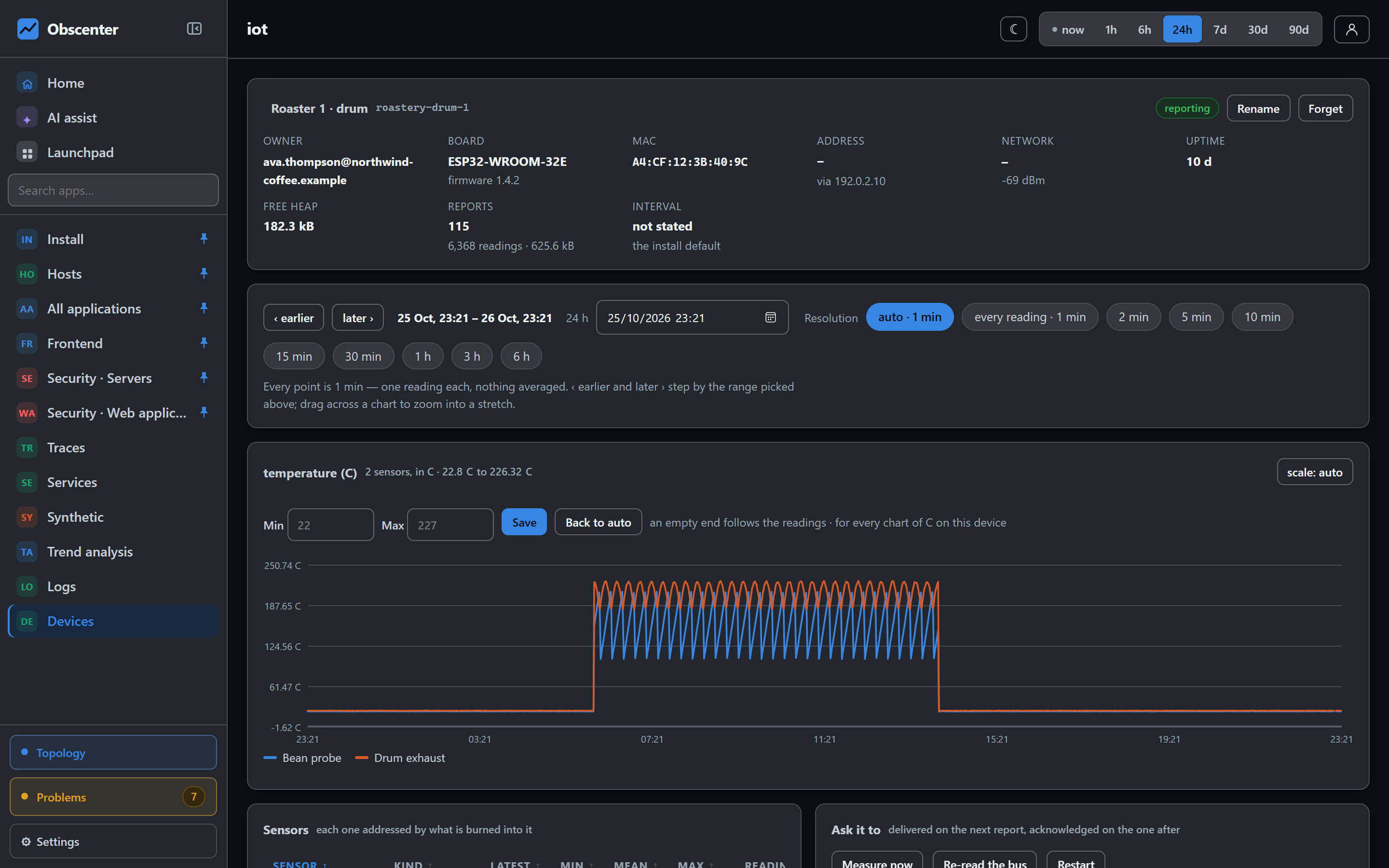
The devices page
Each device shows:
- what it is and where it is on the network;
- how strong its WiFi signal is, and how much memory it has left;
- each sensor on it, with its latest reading and its minimum, average and maximum over the range.
A device is late when it misses the interval the device itself says it uses, not the install's wish. A battery sensor that wakes twice a day is not late five minutes after a report.
One device
- Readings come first, full width, one chart per sensor. A stretch with no report is a gap, never a stretch at zero. Negative readings are drawn below zero. A sensor that varies by a fraction of a degree is drawn on a fitted axis, not as a flat line through a frame from zero.
- Suspect readings, the ones the sensor itself marked
q:0, are counted and not drawn. A probe that is failing becomes visible instead of quiet. - Device facts from every report: model, firmware, MAC, the address the device reports and the one your install saw, SSID, signal, uptime, free memory and boot count. These three numbers explain a device that goes quiet at night. A weak link, a memory leak and a board rebooting in a loop all look the same in the silence, and different in these numbers.
- Logs the firmware sends, by level.
- Report cycle traces: the phases of each report, such as reading the probes, building the payload, the connection, the POST and parsing the answer. A failed report is a mark on the time axis, carrying the status the device saw.
500is the collector failing, and "no answer" is the network.
Rename a device on its page. The name is yours, and the id stays the device's.
Settings and actions
Nothing can reach a device, so everything rides back on the answer to its next report. See The answer is the settings channel.
- Reporting interval: a slider with nine stops, from 2 seconds to 10 minutes. Beside it is what it costs, in readings a day. The default for the whole fleet is set on the devices page. A device's own page overrides it, so you can run everyone at one minute and the one battery board at ten.
- Parameters: any named value, such as an alarm threshold, a LED switch or a calibration offset. They are passed to the device as they are. Your install has no opinion about them.
- Actions: Measure now (read every probe and report immediately), Re-read the bus (after adding or moving a probe) and Restart. Nothing in the list can install, write or read anything on the device. Wiping the WiFi is deliberately absent. A new network is delivered as a parameter instead.
Moving a slider changes nothing on a wire, and the page says so. Each setting is in one of three states:
| State | Means |
|---|---|
| applied | The device confirmed this exact configuration. |
| pending | Asked, and it has not reported since. Normal for a board that sleeps. |
| unaware | It has reported since and never says what it runs. Its firmware does not implement the channel and will never catch up. |
Actions have the same honesty: asked, delivered and acknowledged are three separate moments.
Tickets
A device that stops sending opens a ticket. That happens after the silence time you set, or after three of its own intervals, at least five minutes. It is never critical: an hour or more is serious. The readings themselves have no threshold, on purpose. How much is too much is knowledge about the thing measured, not about the system: 85 °C is a fault on a flow pipe, normal in a sauna and impossible in a fridge. For a value that must alarm, compare it on the device and log it, or watch it in trend analysis.
Device keys
A device reports with a key. The install's agent key works. A device key of your own (iot_…), named after a place such as "cat house", is better. You can switch it off and on, and while it is off its reports are refused and counted. Retiring a key is final. A device that first reported with your key is yours. A member sees their own devices and the ones shared with them, and nothing else. Viewers cannot make keys.
IoT devices are their own capability, on by default. Everything that changes a device, such as renaming it, setting its interval or asking it to restart, needs that capability too.