Docs Security
Vulnerability scanning: web applications and servers
Scan host packages and Node.js dependencies for CVEs against OSV, prioritised by CISA KEV and EPSS, with one upgrade command per machine and reboot detection.
Obscenter knows what you run: every OS package on every machine, every npm package your instrumented services load, and the libraries your pages load from public CDNs. It checks all of it against public vulnerability data, and keeps only what you have to act on in front of you. The pages are under Launchpad → Security.
Where the data comes from
- OSV.dev: advisories for OS packages, looked up by source package, and for npm dependencies.
- CISA KEV: the Known Exploited Vulnerabilities catalogue. A CVE on it is being used in real attacks.
- FIRST EPSS: the probability that a CVE will be exploited in the next 30 days.
The check runs every four hours, at 00, 04, 08, 12, 16 and 20 local time, and once shortly after the install starts. Check now runs it on demand.
What counts as urgent
By default the page shows only what has to be fixed now. An advisory is urgent when any of these is true:
- exploited: it is in the KEV catalogue;
- remote: it can be reached over the network with no login and no user action, it threatens confidentiality or integrity, and the vulnerable code is actually in use;
- critical: the publisher rates it critical;
- likely: EPSS is 10% or more, and the code is in use.
"In use" comes from the host agent, which works out which installed packages a running process has actually loaded. Switch the view to advisories to see everything with an advisory.
Servers
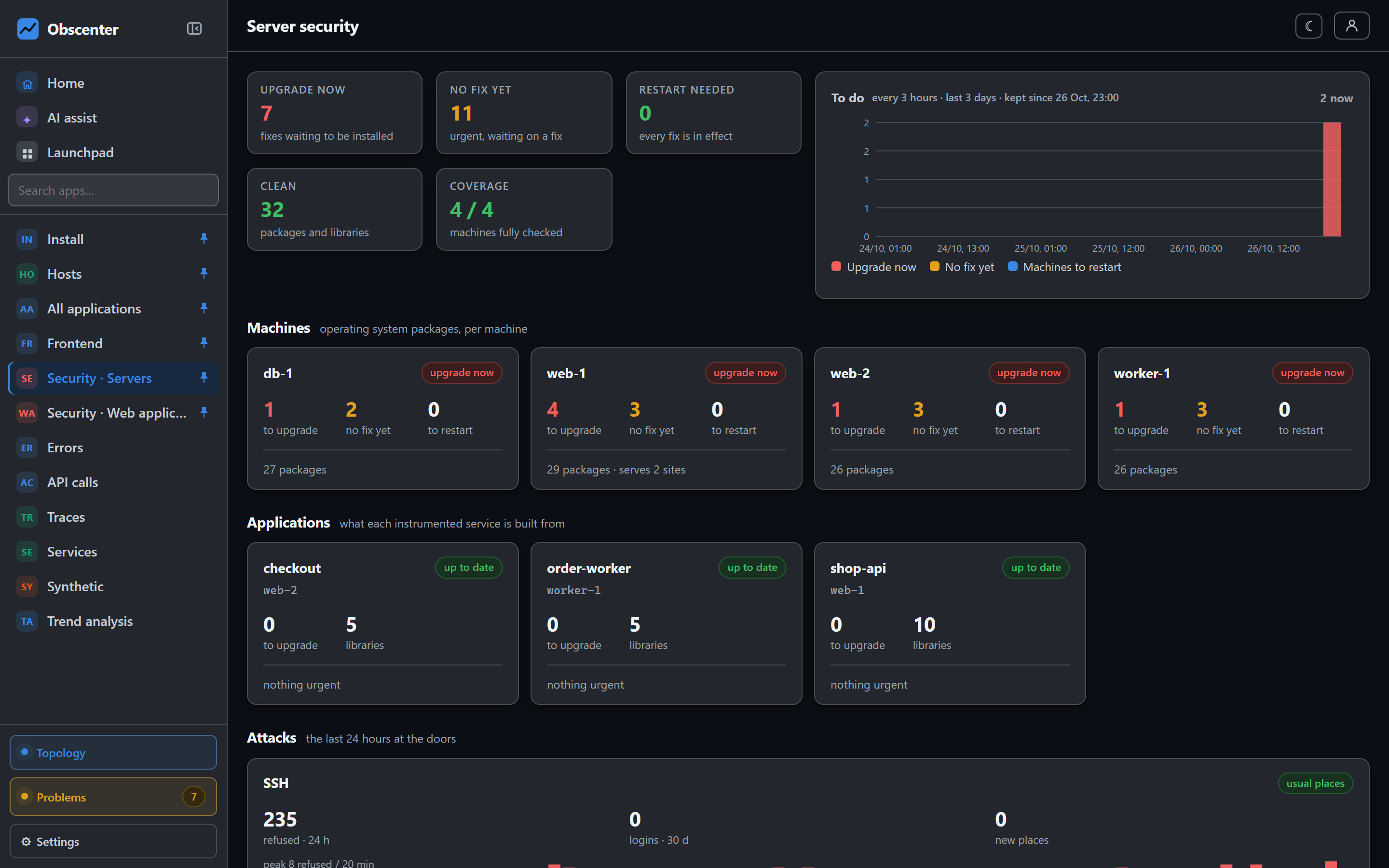
Security → Servers sums it up in tiles:
- Upgrade now: packages with a fix to install.
- No fix yet: urgent, but waiting on the publisher.
- Restart, Clean and Coverage.
Each machine gets one command that installs every fix at once, for example sudo apt-get update && sudo apt-get install --only-upgrade … && sudo reboot. Each service gets the npm install package@version it needs. The page also says how each fix is known.
Restart needed lists two things. A machine needs a reboot when the installed kernel is newer than the running one. A process needs a restart when it still runs old code after an upgrade, because a library on disk is fixed only once the process loads it again. A service whose library list has not been reported for 14 days is shown as stale and not judged. A machine nobody scans is not counted as clean.
A history chart counts upgrade now, no fix yet and restart needed, an hour at a time.
Muting a machine
Mute alarms on a machine takes a reason and a duration: until you unmute it, or 7, 30 or 90 days. Its advisories stay listed, marked muted, but they open no ticket and send no mail.
Web applications
Security → Web application lists the client-side libraries an application's pages load, with their known advisories. A library is recognised from its URL on a public CDN, such as jsDelivr, unpkg, cdnjs or code.jquery.com. A bundled or fingerprinted script cannot be identified this way, and the page says how much it could not identify. An unknown version shows as unchecked, never as clean.
Tickets
- A machine running a package with a known exploited vulnerability opens a critical ticket.
- Severe vulnerabilities to fix now open a serious ticket: reachable remotely with no login, or rated critical, and a fix exists.
- Likely exploited software opens a ticket when its EPSS score is high.
Advisories with no fix released are counted, but not ticketed. Home shows the same counts in its Vulnerabilities tile.