Docs Backend
Topology
A live service map drawn from real traffic: applications, domains, services, data stores, processes and hosts, where every line is a measured call.
Topology sits at the bottom of the menu. It draws your system from what was measured: who called whom, and what runs where. It belongs to the whole install, not to one application. An application filter at the top starts at All applications.
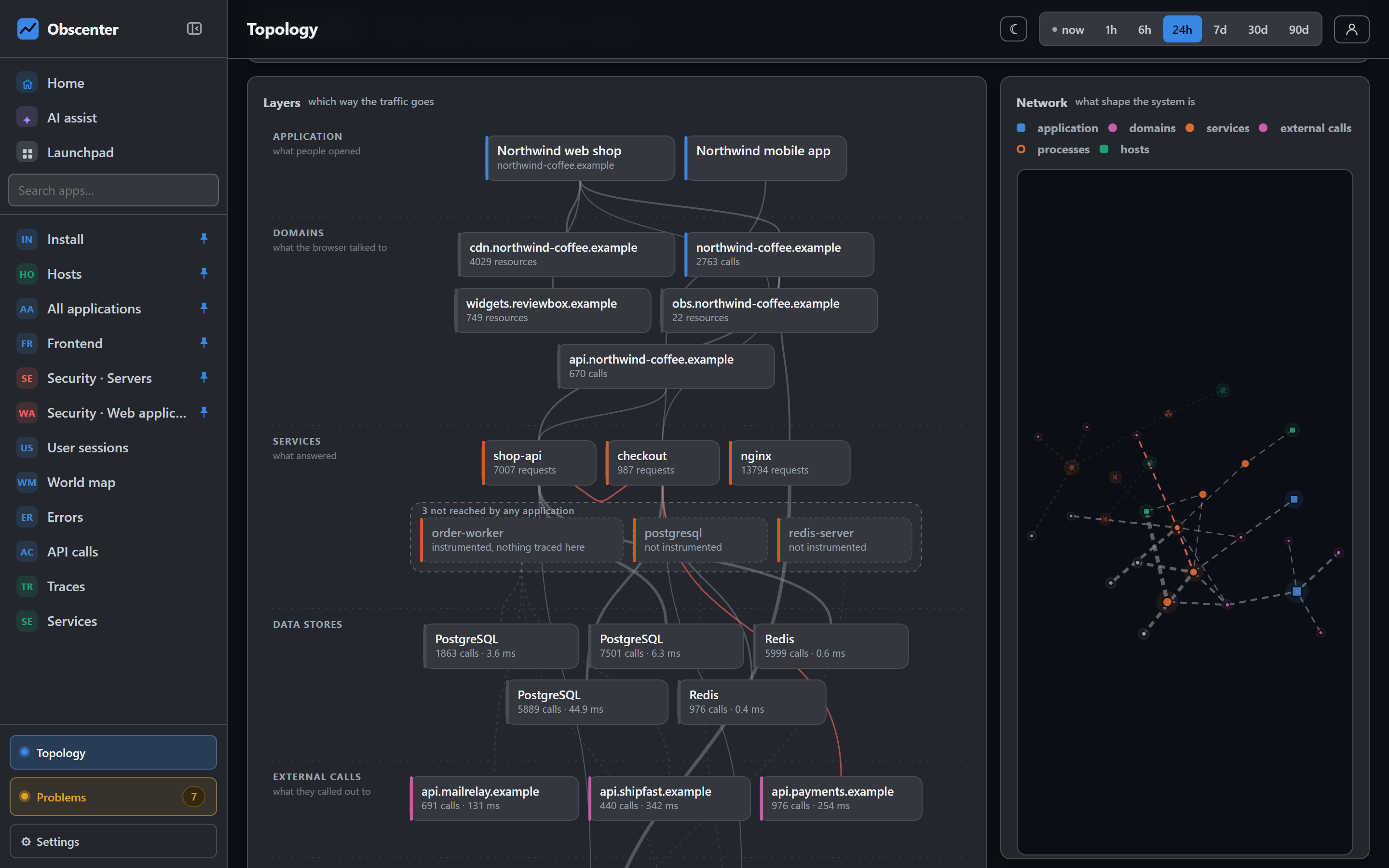
Layers
The Layers view is a stack, from the browser at the top to the machines at the bottom:
- Application: the site, and the origin it is served from.
- Domains: what the browser talked to, your own and third parties.
- Services: what answered, measured from the inside.
- Data stores and External calls: the databases, caches and outside APIs the services used.
- Processes: what the services run in.
- Hosts: what the processes run on.
Every line points down, so a path can be read straight: this page called this domain, which this service answered, in this process, on this machine.
Every line is a measurement
| Line | What proves it |
|---|---|
| application → domain | The browser loaded from it or called it. |
| domain → service | The same trace id on both sides of the call. |
| application → service | The backend request carried the session in its baggage. |
| service → service | The outgoing span's id is the called span's parent. |
| service → process | The same machine and the same process id. |
| process → host | Where it runs. |
Every machine the agents report is on the map. A machine that no measurement connects to anything stands there dashed, with no line, and a sentence says why: no instrumented service runs on it, so no call was followed that far. A line nobody measured would be worse than empty space.
Services and Node.js processes that run but are reached by nothing are drawn in a dashed pen inside their layer, for example "6 not reached by any application". These are the actionable part of the map: services that answer but that nobody has instrumented yet. The Hide the N idle button takes them away.
Network
The Network view draws the same data freely. Things that talk to each other sit together, hubs look like hubs, and what nothing connects drifts to the edge. The layout is computed once and is deterministic, so the same system always has the same shape. It does not move while you reach for a node.
- Scroll to zoom at the pointer, and drag to pan.
- Click a node to highlight its own lines, in both directions, and fade the rest.
- Labels appear as you zoom, and stay the same size.
The kinds are told apart by colour and by shape. Applications and hosts are rounded squares, domains and services are circles, and a process is a ring in its service's colour. The colours are checked for colour-blind readers in both themes.
Search
A box above the map works in both views. Type, and the matches are highlighted while the rest fades. In the network view, Enter jumps to the first match and selects it.
The same picture elsewhere
An application's overview, a service's page and a machine's page each show the same graph from where you stand. Every other box is a link to the page that draws it from there. Home shows a live version of it too. See Home.