Docs Problems & alerting
How problem detection works
Automatic problem detection with learned baselines: what Obscenter judges, the thresholds it uses, and how a ticket opens once, escalates and closes on its own.
Most of the dashboard answers questions you ask. The detection engine asks its own. Every two minutes it compares what is happening now with what is normal for each thing it watches. When the two disagree, it opens a ticket that explains itself with numbers. No language model takes part in opening it. A model can explain a ticket afterwards if you ask it to. Where the install's administrator switched the AI filter on for an organisation, a model reads a new ticket before its alert goes out, and may hold the alert of a ticket that is not critical. See AI modes.
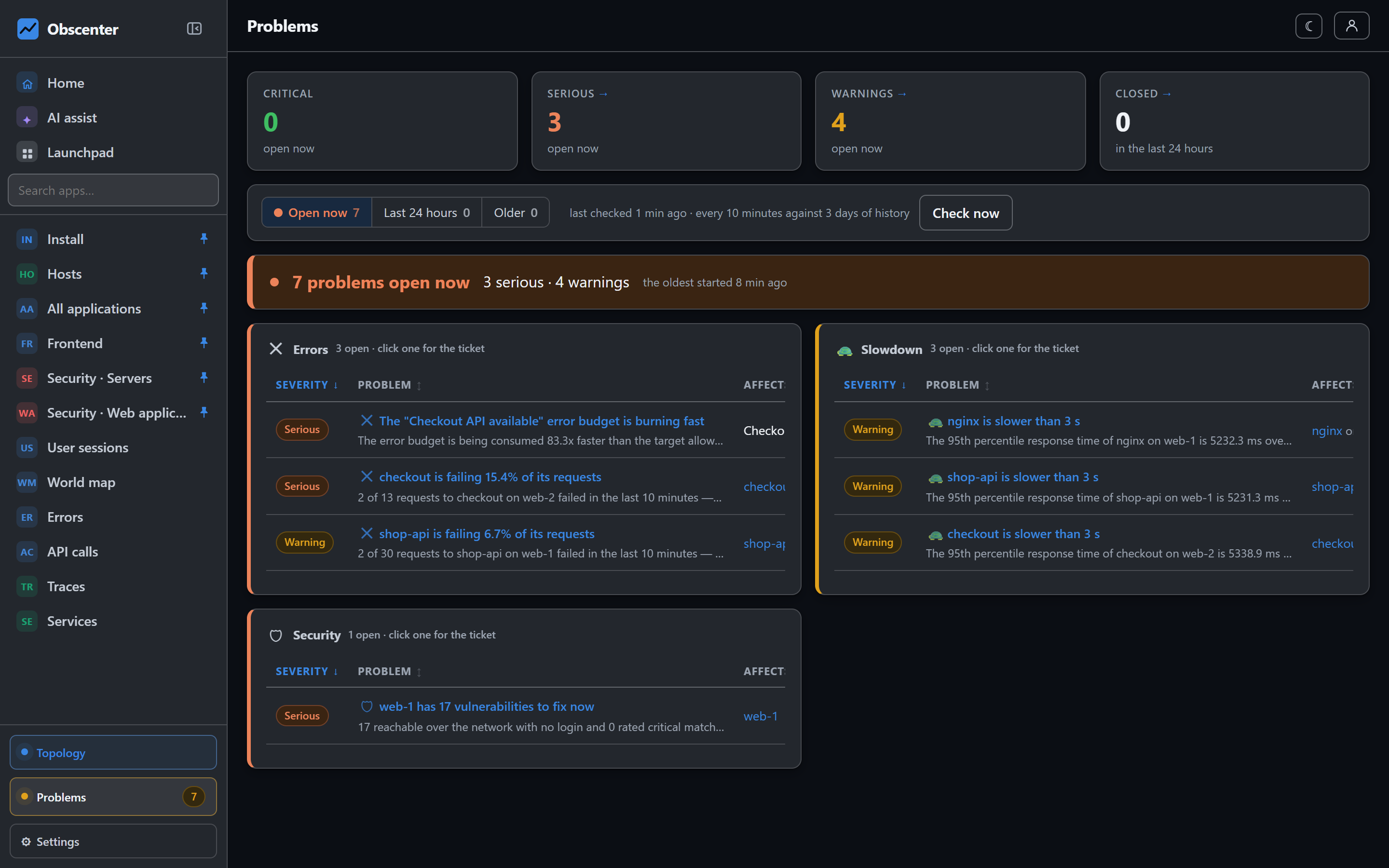
A ticket, not an alert
An alert that fires every minute stops carrying information by the twentieth time. A problem opens once. It keeps its identity while the fault lasts and collects evidence. When the measurement has been back to normal for 30 minutes, it closes by itself, recording how long it lasted. One fault is one ticket, however many times the scan runs.
- When several detectors see the same fault, the findings are merged and the most severe is kept.
- If the fault gets worse, the ticket's severity rises, the cause is worked out again, and the escalation is notified. A ticket only gets worse while it is open. It never quietly gets better.
- An open ticket that has not been seen for more than 12 minutes says so, while it waits out its 30 minutes.
- Severities are warning, serious and critical.
The threshold is the baseline
A fixed "500 ms is bad" is wrong on every install. It fires all day on one service and is blind on another. So most measurements are compared with their own last three days, in ten-minute buckets. The comparison uses the median and the median absolute deviation, not the mean and standard deviation. A single outage in the baseline would pull a mean far enough to hide the next one. Something needs at least two hours of history before it is compared with itself. Before that, only absolute rules apply.
Absolute thresholds are used only where a number means something on its own. A disk that is 96% full is full, whatever it did last week.
Services and requests
| Ticket | Opens when |
|---|---|
| Slow service | The p95 is above the application's Fine up to line (3 s by default), and enough requests are over it. It must also be either clearly worse than usual (twice the baseline p95, and statistically unusual) or past Critical above (10 s by default). At least 8 requests. |
| Failing requests | The error rate is unusual for this service, or 20% or more with no history. 15% or more is serious, and half or more is critical. |
| Exceptions | A burst of thrown exceptions well above the service's normal. |
| Service stopped reporting | An instrumented service that worked in at least three of the last six hours goes quiet. The silence must be well beyond its own usual gaps, and at least 6 minutes. |
| Event loop blocked | The p75 loop lag per request is 100 ms or more, over at least 20 calls. |
| Thread saturated or held | See Threads. |
| Holding on to memory | A heap that grows steadily for six hours. The ticket says how many hours are left. See Memory. |
The two slow lines are set per application under Application settings → How slow is slow. The AI assistant can propose new values too.
Machines
A machine that stops reporting for five minutes opens a ticket. After 15 minutes it is critical. Resource rules use ten-minute averages over at least three samples:
| Measurement | Warning | Serious | Critical |
|---|---|---|---|
| CPU | 85% | 93% | 97% |
| Memory | 88% | 94% | 97% |
| Swap used | 95% | 98% | 99.5% |
| Disk, per mount | 85% | 92% | 96% |
| TCP retransmissions | 2% | 5% | 10% |
| Major page faults per second | 50 | 250 | 1000 |
- Swap has a rule of its own only when there is at least 256 MB of swap and memory is not already high. High swap together with high memory makes the memory ticket one step worse.
- Page faults count only while memory is above 80%.
- Memory tickets list the five programs holding the most.
- Retransmissions need enough traffic to mean something.
Processes and containers have rules too:
- a process at 80% of its file-descriptor limit;
- a thread count that keeps growing;
- a container at 85% of its memory limit;
- a container being throttled heavily;
- a watched port with nothing listening.
Databases have rules for deadlocks, rollbacks and cache hit ratio. See Database monitoring.
Visitors
- Browser errors: a rise well above the application's normal. Severity follows how many sessions were reached, and the ticket says how many error types are new.
- Core Web Vitals: a page whose p75 is poor over at least 20 views. Poor means LCP above 4 s, INP above 500 ms, CLS above 0.25, or a page load above 8 s.
- Frustration: visitors in at least three sessions clicking things that do not respond, as rage or dead clicks.
- Traffic collapse: a site that normally has visitors suddenly receives almost none, or none at all.
Checks, objectives, security and devices
- Synthetic checks: two failed runs in a row. Four is critical. A certificate that expires within 14 days opens a ticket as well. See Synthetic monitoring.
- SLOs: an error budget burning fast, or an objective breached. See SLOs and error budgets.
- Vulnerabilities: a package with a known exploited vulnerability is always critical. Severe and likely-exploited vulnerabilities with a fix available are tickets too. See Vulnerability scanning.
- Logins and scans: SSH or Windows password guessing, a login that succeeded after guessing, a login from a place not seen before, and scanning that a server answered. See SSH logins, Windows logons and scanning.
- IoT devices: a device that stops sending, measured against the interval the device itself declares. Reading values carry no threshold, on purpose. 85 °C is a fault on a flow pipe and normal in a sauna.
- AI budget: when you set a token budget for models, it opens a ticket at 80% used.
- Opened by AI: only where the install's administrator allowed it for an organisation. A model looks over that organisation every 30 minutes and may open a critical ticket of its own. See AI modes.
Every measurement is judged, or says why not
Every measured column in the product is registered either with the detector that watches it, or with a written reason why it deliberately does not alert. A threshold that fires on healthy machines is how a monitoring product gets switched off. Not alerting is therefore often the right answer, as long as it is a decision somebody wrote down. A check fails the build if a measurement is in neither list.
The detectors are tested the same way. Each test builds a healthy world, checks that nothing fires, breaks exactly one thing, and checks that the right ticket opens. One slow request among a hundred fast ones does not open a ticket. A shifted distribution does.
Your own deploys
For 15 minutes after Obscenter itself restarts, findings about its own parts are capped at warning, with a note saying why. That covers a deploy or its machine rebooting. A new service that ran briefly and stopped, as tests and deploys do, does not open a "stopped reporting" ticket. A service that has been running for days does.