Docs Frontend
User sessions
Search and filter real user sessions by page, country, browser, poor vitals or errors, and open each one as a timeline of views, actions and backend calls.
Frontend → User sessions lists visits one by one. It is where every aggregate in the product ends up. A KPI tile, a chart bucket, a country on the map, an error group or a poor vital all open this list, filtered to the sessions that produced the number.
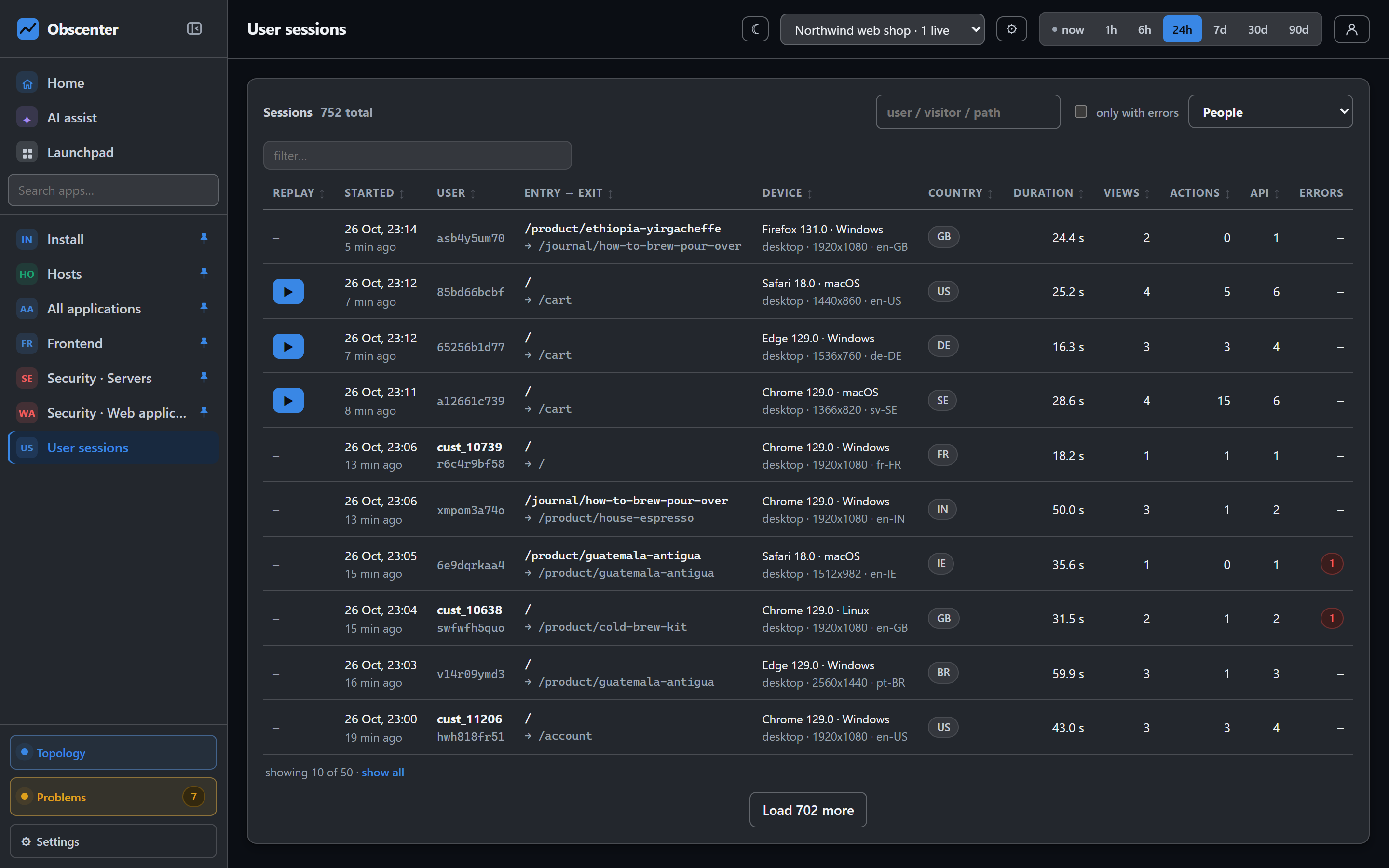
The list
Each row shows whether a recording exists, when the session started, the user, the entry and exit pages, the device, the country, the duration, and how many views, actions, API calls and errors it had. Search by user, visitor or path, or tick only with errors.
A selector chooses People, Synthetic checks or Both. Visits made by your own browser checks are marked when they arrive and kept out of every other number in the product. Visitors that identify themselves as bots are dropped at the collector.
Filters
Filters arrive from wherever you clicked, and each shows as a chip with a readable label. They include:
- country, region and city, browser, OS, device and language;
- page, referrer, and a time window;
- a poor vital (LCP, INP, CLS, FCP, TTFB or load);
- a session attribute and its value, a section that was seen, time on page and scroll depth;
- campaign facts: source, channel, medium, campaign, content, term, the app whose in-app browser opened the page, and a click id;
- for mobile apps: client, handset, app version and agent version.
Remove a chip to widen the list again.
One session
Opening a session shows its duration, views, API calls, errors, environment and entry page. Below that are:
- Views: each page with its type (load, route or back-forward cache), load time, time on page, scroll depth, resource count and backend time.
- Events and actions: a timeline of clicks, rage clicks, dead clicks, inputs, custom events and errors, with an Apdex rating per action.
- Backend requests: the server-side requests this visit caused, with service, route, status and time. They are linked by the trace id the tag sent, so each one opens its trace.
- Attributes: values read from the page, such as the signed-in user's name.
- Device and environment: browser and OS with versions, device type, screen and viewport, pixel ratio, memory and cores where the browser tells, connection type, language, time zone, country and referrer. Most fields drill to sessions with the same value.
If the session was recorded, a play button opens the replay.
One page load
Click a view to open its page load. The page shows TTFB, FCP, LCP, DOMContentLoaded, load and bytes transferred, and the full resource waterfall. It also shows the backend calls made during the load, what the servers did meanwhile, how long the main thread was blocked, and the errors on that view.
The waterfall phases do not overlap, and they add up exactly to each resource's duration: queueing, DNS, TCP, TLS, waiting for the server, and download. TTFB is not drawn as a phase of its own. It already contains DNS, TCP and TLS, and drawing it as a bar would count them twice. Server time and network time are shown separately, for the document and summed over all resources.
Session attributes
Under Application settings → Session attributes you can add up to ten rules that read a value off the page, for example the user name in the header. One rule can be marked as the identity, and that value becomes the session's user. Only an element's text is read, never an input's value or an HTML attribute, and text inside .rum-block or .rum-mask is skipped. From your own code, rum('identify', id, traits) does the same job.
What counts as a session
A session starts with the first view and ends after 30 minutes without activity, or after the application's own timeout. It never lasts longer than four hours. A new session after a pause also starts a new replay recording. Visitors are told apart by a random id in local storage. No cookie is set, and no IP address is stored. See Privacy and data protection.