Docs Backend
Services and distributed traces
Distributed tracing for Node.js: services with request rate, errors and latency, every trace span by span, and the link from a click to its SQL query.
A service is a process that answers requests and is measured from the inside. On Linux, that is a Node.js service the agent instruments (see Tracing Node.js services). Services in other languages join through OpenTelemetry. A service is the only layer that knows about requests, and it carries no CPU or memory of its own. Those belong to its process.
Services
Backend → Services lists every instrumented service with its request rate, errors and latency percentiles. The p75 is coloured amber from 400 ms and red from 1 s. Drag across a chart to open the traces of that window. Also running — found by the agent, not traced lists the Node.js processes that are running but not yet instrumented. Knowing which ones send nothing is part of the point.
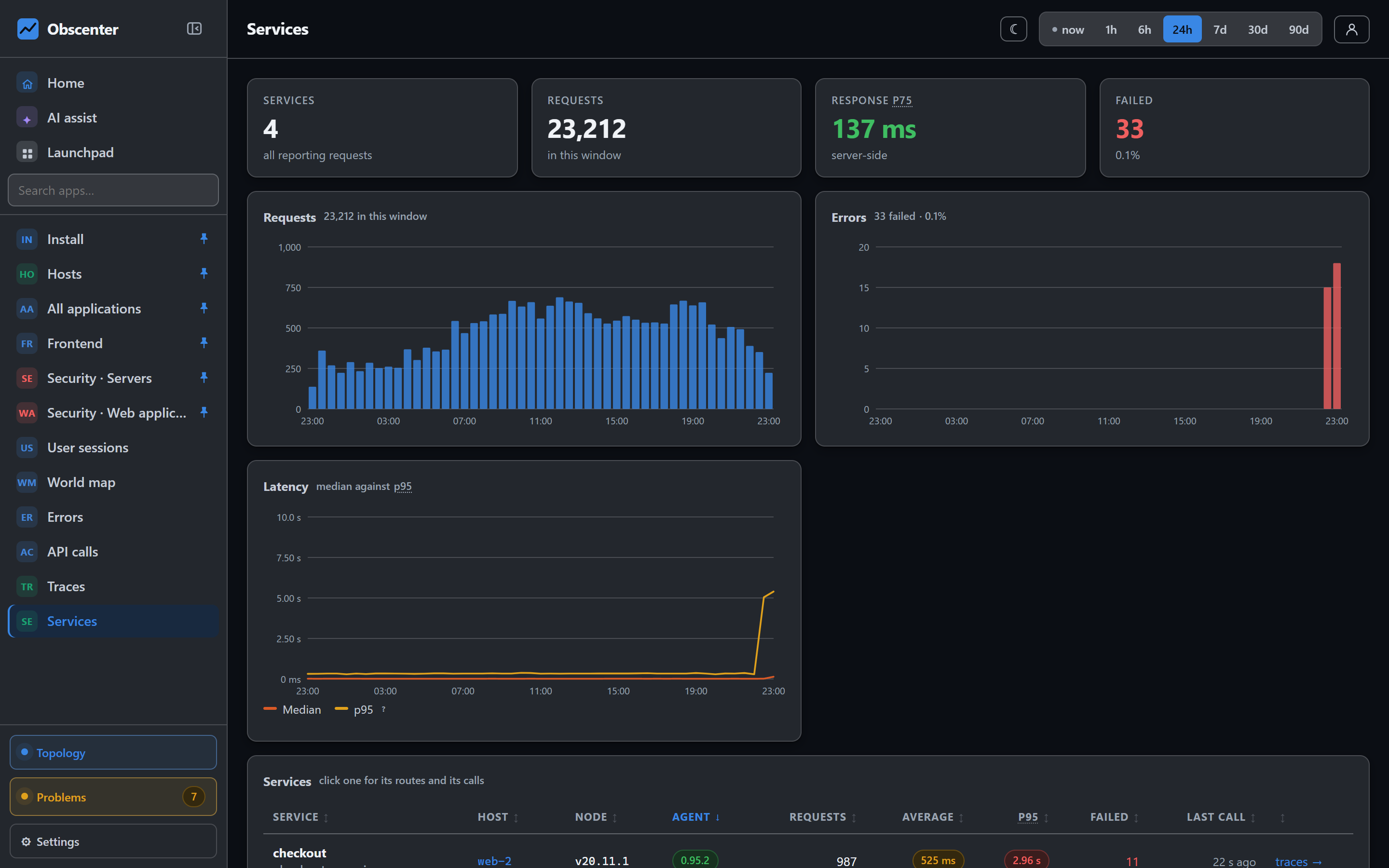
One service's page shows:
- its request and error rates, median against p95 latency, its replicas and its memory;
- Routes: with ids collapsed, so
/orders/42/itemsand/orders/43/itemsare one row,/orders/:id/items; - Where the callers were: a country map of the callers. Addresses are never stored, only the country and a salted hash, and this needs the proxy to pass
X-Real-IP; - its traces: the most recent and the slowest.
A service that is not instrumented disappears after it has been missing for a while, as long as its host still reports. An instrumented service is retired only when its unit is no longer installed, because a crash and a deletion look the same on a list of running processes. Any later sighting brings a retired service back, and it is watched again from its first report.
What is captured
For each request the agent records the method, the route with ids replaced, the status and the duration. It also records spans:
- database calls through
pg,mysql/mysql2,sqliteandmongodb; - cache calls through
redisandioredis; - outgoing
httpandfetchcalls; - any spans the application creates with
@opentelemetry/api, picked up in the process with no exporter needed.
When CPU profiling is on, sampled code frames show where the time went inside your own functions.
Two more things can be kept, and both are off by default. Under Settings → Agent & keys → Server agent, one switch keeps request and response headers on server traces. It uses a fixed allowlist and never includes authorization or cookies. The other keeps what a request logged, and what it threw.
Traces
Backend → Traces lists individual calls. You can sort by slowest or most recent, show failed calls only, or filter by service. One trace shows:
- The waterfall: the request, then database, cache, HTTP and code spans in order, plus points for log lines and exceptions. Each span carries a badge for its source: the agent, a sampled frame, or OpenTelemetry.
- Execution breakdown: how the time split between CPU, the database, the network and waiting.
- Who called whom: the services this call passed through.
- The browser's side of the same call: the session that caused it, when the page sent a
traceparent.
Five or more identical calls in one trace are flagged as a likely N+1 query.
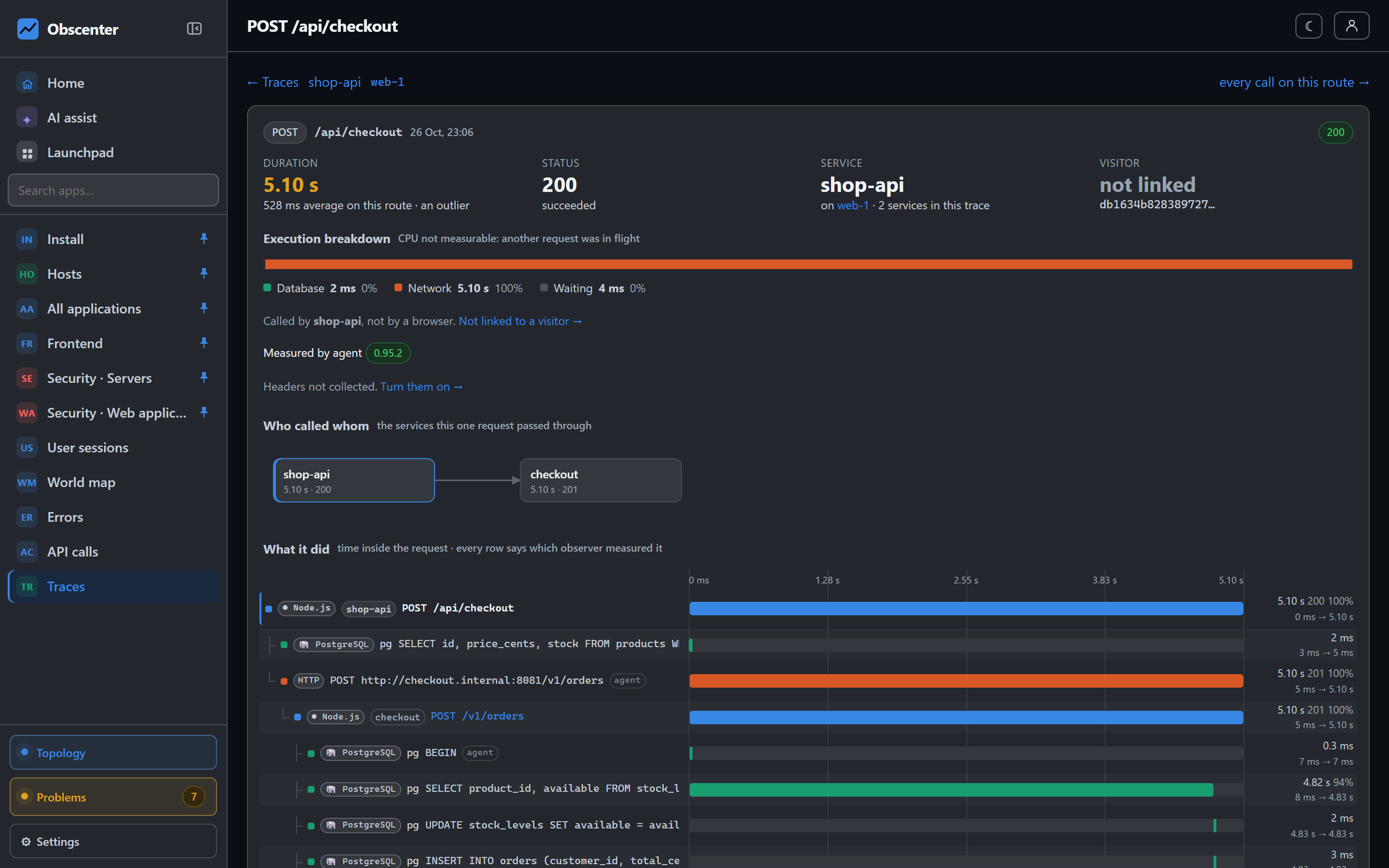
From the click to the query
The browser tag adds traceparent to calls to the origins you trace. The agent continues the same trace inside the service, and passes it on to the services that service calls. So one click on a page, the API request it made, every service that request passed through, and the query that answered are one record. When the page itself is rendered on the server, nothing in the browser can send a header. Instead the trace id comes back on the response, as a Server-Timing entry or in the injected tag, so that case is linked too.
With identity on, a baggage header names the visitor's session. A backend request then leads straight back to the session and its replay.
What is watched
A service opens a ticket on its own in four cases:
- it answers slower than the application's Fine up to line, and either much worse than usual or past Critical above;
- it fails a growing share of its requests;
- it starts throwing exceptions;
- it stops reporting.
The ticket's root cause follows the calls this service made. See Root cause.