Docs Automation & analysis
Trend analysis
Compare today with yesterday, last week or the usual range for any host, service, application, check or IoT sensor, bucket by bucket and to the same hour.
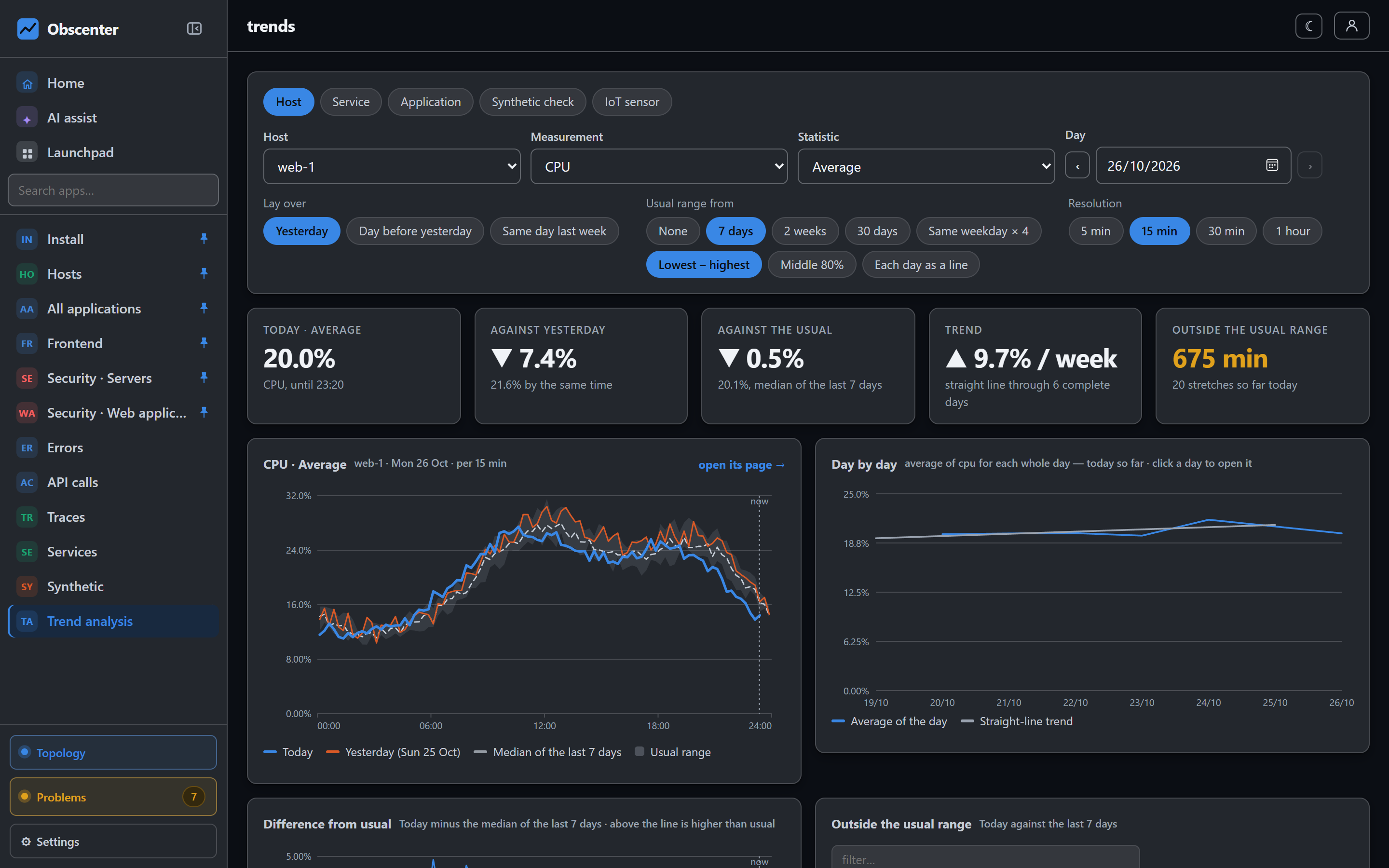
Launchpad → Analysis → Trend analysis reads one measurement of one thing a day at a time. It lays today over the days before it. It answers "is this normal for a Tuesday?" and "is it getting worse week by week?".
What you can trend
| Subject | Measurements |
|---|---|
| Host | CPU, memory used, load average, swap used, disk used, network in and out, disk reads and writes, open TCP connections, TCP retransmissions |
| Service | Requests per minute, failed requests, failure rate, response time, CPU time per request. Can be narrowed to one route. |
| Application | Page views, sessions started, JavaScript errors, page load time, TTFB, FCP, LCP, INP, CLS. Can be narrowed to one path. |
| Synthetic check | Response time, time to first byte, availability |
| IoT sensor | The reading, in the sensor's own unit |
Pick a statistic where the measurement offers one: average, minimum, maximum, median, or the 75th, 90th, 95th or 99th percentile. Counts are drawn as rates per minute, so buckets of different sizes compare.
Comparing days
- Bucket: 5, 15 (the default), 30 or 60 minutes. Every day gets the same grid of buckets.
- Lay over: yesterday (on by default), the day before yesterday, and the same day last week.
- Usual range from: none, 7 days (the default), 2 weeks, 30 days, or the same weekday four times. The band shows lowest to highest, or the middle 80%.
- Each day as a line draws every earlier day too.
Days are your local midnights. Days of 23 or 25 hours, around a clock change, are handled. Up to 32 days can be read at once.
Until the same hour
Comparing today's total with yesterday's whole day always makes today look small before midnight. When the day shown is today, every day also gets its figure up to the current time. The tiles say "until 14:30" and "by the same time". The table has an Until column, so today is compared like for like.
Reading the page
The tiles show the subject and statistic, the change against yesterday, the change against the usual, the trend in percent per week, and how long the day spent outside the usual range. The trend needs three days with data. For IoT readings, change is shown as a difference in the reading's unit, not as a percentage. Below are cards for the difference from usual, day by day with a straight-line trend, the stretches outside the usual range, and each day. You see only the hosts, services, applications, checks and sensors your account can see.
A very long percentile over many days can be too much to compute. The page then asks you to pick the average, or fewer days.
Trends and tickets
The detection engine also compares with the past, over three days in ten-minute buckets, and opens tickets by itself. See The threshold is the baseline. Trend analysis is the same kind of question, asked by you, over the span you choose.